
1. To reset your debit card PIN, you will need to contact 1-800-992-3808 from a phone number associated with your Republic Bank account. If not, you may be prompted to enter the 10-digit phone number on file with the bank.
2. Follow the instructions provided and enter the answers that apply. Some common verification question options are:
- Date of Birth
- Mailing Zip Code
- Social Security Number (If you don't have a Social Security Number, enter 0000 when prompted both times)
3. If you pass verification, you will be prompted to set your Personal ID Number (PIN).
SECURITY TIP: Choose a 4-digit number that you can remember. Do not use the last 4 digits of your card number or something another person could guess like 1234 or 1111.
You may also change your PIN at any Republic Bank ATM location or by visiting Card Alerts & Controls* in the Services menu of your Online & Mobile Banking account.
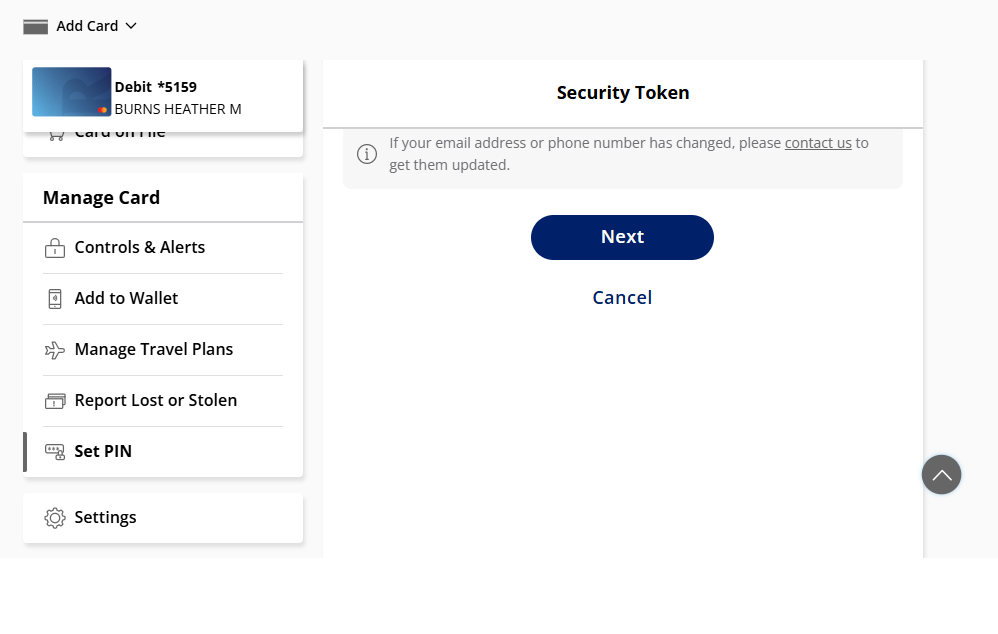
In the Card Alerts & Controls feature, select "Set PIN" on the Manage Card menu and select your mobile number or email address to receive an enter your Security Token to reset your debit card PIN.
NOTE: You must know your current PIN in order to change your PIN using the phone number above or a Republic Bank ATM.
If you are unable to successfully verify your debit card when contacting the above number, please contact us by phone or chat during business hours, so we can help you verify your information on file.
Click here for Republic Bank Customer Service Hours.
Turning off your card in Card Alerts & Controls only prevents the card from being used, it does not close your card. Recurring transactions will still process. Turning your card off is not a replacement for reporting your card as lost or stolen. Contact us immediately at 888-584-3600 if you believe your card is lost or stolen, or if you suspect fraudulent activity.
Can't find what you're looking for? Contact us.